
Two-device call demo
Steven uses the React Native example. hao.dev7 uses the Flutter example. Both examples use the same Kotlin call core and native LiveKit adapter. Each Home identifies its owner and shows the other person as the contact: Steven sees hao.dev7, and hao.dev7 sees Steven. These are demo identities, not authenticated accounts.
For native incoming behavior, watch the separate secure lock-screen voice/video demo.
Steven calls hao.dev7
React Native and Flutter · development build. One native call lifecycle.
Recorded from two Android emulators with real FCM and native LiveKit. The center column describes each recorded action. Licensed sample clips feed the cameras; people shown are not Callx endorsers. Silent recording; the test checks media connection and remote video, not audible speech. Read the transcript · Download MP4 · GIF preview
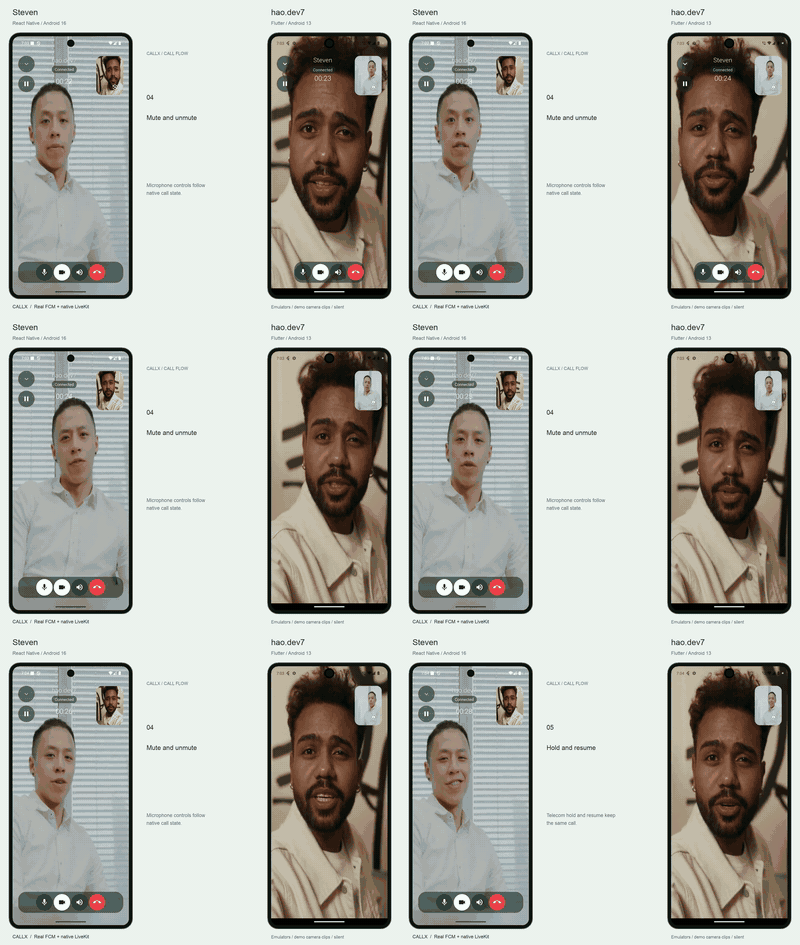
What you are watching
| Part | Recording setup |
|---|---|
| Steven, on the left | React Native example, Android 16 / API 36 emulator |
| hao.dev7, on the right | Flutter example, Android 13 / API 33 emulator |
| Incoming invitation | Real FCM delivery to the Android native host |
| Accept and end signaling | The local demo harness relays example-only test signals through FCM |
| Audio/video | Two distinct LiveKit participants in the same local room; native media on both devices |
| Camera images | Licensed stock clips fed into the emulator cameras, then published through native LiveKit |
| Call UI | Optional Callx framework overlay, in-app mini-call and Android system PiP |
The harness supplies signaling and development credentials. A production app needs its own authenticated backend and media-token endpoint. UI components observe native snapshots; minimizing and expanding the overlay do not create or answer another call.
Recording transcript
- Steven places an outgoing video call to hao.dev7. The receiving emulator is on Android Home.
- The native incoming call surface shows Steven. hao.dev7 accepts it.
- Both hosts join the same LiveKit room. Camera publishing is enabled explicitly on both devices.
- Video controls auto-hide, then reappear on touch. Steven mutes/unmutes and holds/resumes from the direct top-left control. hao.dev7 switches the local camera.
- hao.dev7 minimizes the overlay, sees the app's Home screen and returns to the call.
- Steven leaves the app with Home: Android enters system PiP automatically. He returns to the app.
- Both cameras are disabled. PiP shows the example's brand background and logo.
- hao.dev7 ends the call. The harness relays the end signal to Steven and the call overlay closes.
The MP4 presents the call timeline side by side in neutral device frames, with action descriptions in the center column and more space between the phones. The main recording uses the emulator's continuous 30 fps recorder. For Steven's final camera-off/PiP/end interval, timestamped full-screen screencap images replace the recorder's stale task-icon output. Those frames are held between captures; that interval has a lower capture rate. No call action is reordered or sped up, and no camera image is composited over the app after recording. Captions name the actions. The short GIF previews the video portion, rather than every step. Screen recordings have no audio track. The harness checks native media connection and remote-video events; this does not demonstrate audible speech or acoustic quality.
Camera footage credits
The demo names are fictional. The people in the stock clips are not the Callx developers, customers or endorsers. Footage is reused under the Pexels license:
- Steven's camera: Man Talking While Looking at Camera, ANTONI SHKRABA production.
- hao.dev7's camera: Man Looking and Talking To The Camera, MART PRODUCTION.
Source clips are center-cropped with their aspect ratio preserved and counter-rotated for the emulator sensor. The app's local and remote video views use cover, so excess image area is cropped rather than stretched. Each device's front and back cameras use its same sample clip; switching exercises the native camera path, not a second filming location.
Reproduce locally
Build and install both example apps, grant camera/microphone permissions, configure Firebase for their native hosts, and start the local LiveKit server. Install the UI probe from tool/android-ui as described in the device-testing guide. Stop call:console before running the demo: this harness uses its port, 8787.
CALLX_DEMO_SERVICE_ACCOUNT=/absolute/path/to/firebase-service-account.json \
  node tool/demo-two-device.mts \
  --caller emulator-5558 --callee emulator-5556 \
  --capture emulator-record \
  --output /tmp/callx-demo-new-take
Keep the service account outside version control. The harness does not print device tokens or media credentials. It saves original WebM recordings, fallback screen captures, their timestamps and result.json locally. The final public MP4 has no audio track. Check that the result passes and inspect the captures before sharing them. Restart the ordinary console with npm run call:console after the harness exits.
For file-backed cameras, prepare an authorized source clip for a 640×480 sensor without stretching (the counter-rotation below matches the API 33/36 AVDs used here):
ffmpeg -i source.mp4 \
  -vf 'scale=480:640:force_original_aspect_ratio=increase,crop=480:640,transpose=2' \
  -an -c:v libx264 -pix_fmt yuv420p camera.mp4
Launch each AVD with -camera-front videofile:/absolute/path/to/camera.mp4 and -camera-back videofile:/absolute/path/to/camera.mp4. This requires an emulator version supporting videofile cameras (this recording uses 36.5). Check actual orientation on the receiving device before recording. Pixel skins can be enabled locally with -skin pixel_7 and -skindir /path/to/Android/sdk/skins; the exported composition uses its own neutral frame artwork. This take uses -gpu host -memory 2048 -cores 2 on both AVDs. Check startup logs for the hardware renderer: automatic software-rendering fallback under memory pressure can make the camera visibly stutter even when the recording file reports 30 fps. Record before rendering to avoid competing for CPU resources.
To compose a passing take, use an FFmpeg binary with H.264 and drawtext support:
node tool/render-call-demo.mts \
  --input /tmp/callx-demo-new-take \
  --output /tmp/callx-demo-assets \
  --ffmpeg /absolute/path/to/ffmpeg \
  --font /absolute/path/to/font.ttf
The renderer produces the continuous MP4, poster, short GIF, action captions and chapter times. It keeps the recorded order and speed. Still frames at the end are extended briefly so both screens remain visible through the last chapter.
Verification boundary
This is an Android emulator demonstration. It does not establish physical-device acceptance, iOS behavior, secure lock-screen video behavior, network reconnection or crash recovery. See status and testing for the remaining platform gates. This recording shows Android only; iOS system PiP is experimental. System PiP on Android uses the host activity; the in-app mini-call is a separate framework component.