
Android
Answer from the lock screen
Native incoming, answer and decline, and in-call controls without unlocking.
Explore this feature →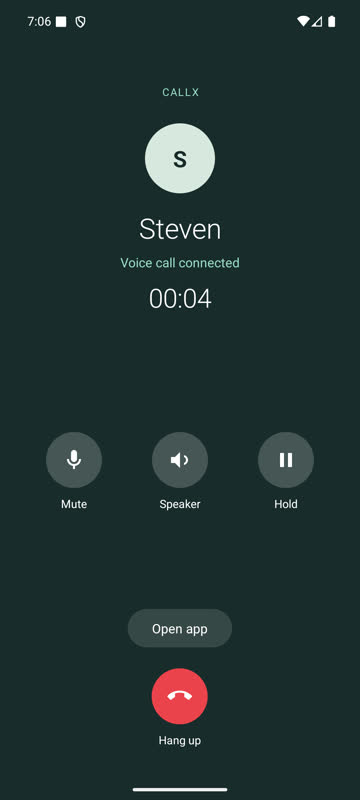
Support Callx
Free, MIT and independent. Sponsors fund its maintenance through every OS release.
Callx connects native incoming calls, reliable call state, native media integration and optional call UI for Flutter and React Native. Use the layers you need: your app keeps its navigation, backend and visual identity.
FROM INCOMING TO IN-CALL
Native call ownership, optional UI and a media adapter. See what each layer gives your app.
Native incoming, answer and decline, and in-call controls without unlocking.
Explore this feature →Native video surfaces and camera commands. Choose your own screens or customize the optional Callx UI.
Explore this feature →
Back minimizes into your app. Expand returns to the same call, with your Home screen still mounted.
Explore this feature →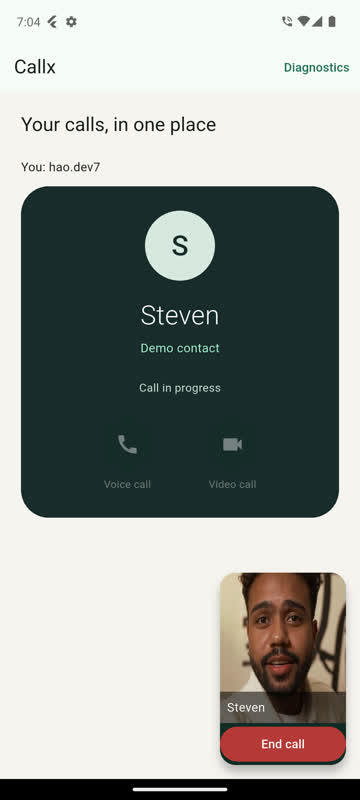
Picture-in-picture shows video or your colors and logo when the user leaves the app.
Explore this feature →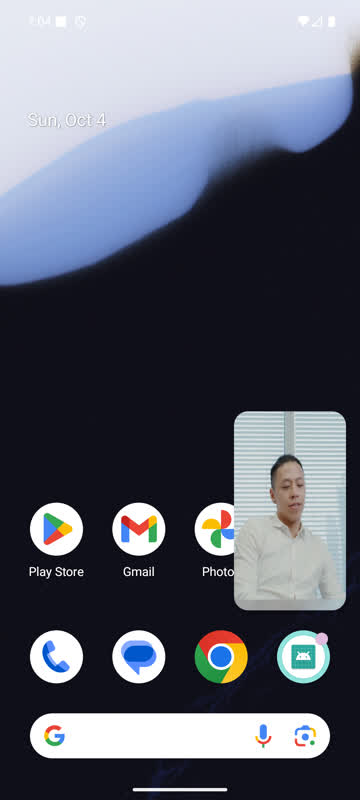
Actual Android emulator captures with native Telecom and LiveKit. Camera inputs are licensed sample clips. Check platform coverage and verification →
| Layer | Available today | Where to start |
|---|---|---|
| Native call core | CallKit/PushKit on iOS, self-managed Core-Telecom and incoming presentation on Android; commands, durable journal, replay and recovery | Architecture |
| Media | Optional native LiveKit audio/video adapter, native video views, mute and camera commands; bring your own media through the adapter interface | LiveKit · Own media |
| App presentation | Your Dart/TypeScript UI, or supplied call screen, root overlay and in-app mini-call with colors, logo and custom controls | Call UI |
| Android continuation | System PiP with video or branded fallback, separate from the mini-call inside your app | Video and PiP |
| Phone features | Speaker, earpiece and headset switching, keypad tones (DTMF), caller-name updates, call back from iOS Recents/Siri and from Android missed-call notifications | Phone features |
| Integration tools | Setup/code generator, example apps, local call console, test pushes and adapter conformance | Setup · First call |
The native coordinator remains the single call-state owner. Presentation observes snapshots; an adapter joins media. Adding a UI component does not create another calling engine.
| Capability | Android | iOS |
|---|---|---|
| Native incoming/reporting and typed call lifecycle | Implemented; automated and emulator checks | Implemented; automated and Simulator checks |
| LiveKit audio/video | Implemented; Android video emulator trials | Implemented; physical-device audio/video acceptance pending |
| Framework overlay and in-app mini-call | Available | Available; platform acceptance still needed |
| System picture-in-picture | Available; automatic entry needs Android 12+ | Experimental, iOS 15+; not yet tried on an iPhone |
| Persistent native locked-call timer, mute, hold and audio controls | Available; RN API 36 secure-PIN demo | CallKit owns system presentation; this Android screen is not an iOS feature |
| Audio routes, DTMF, caller-name updates | Available; automated checks, Bluetooth needs a device | Available; automated and Simulator checks, Bluetooth and keypad need an iPhone |
| Call back from outside the app | Missed-call notification with Call back | Recents, contact cards and Siri; not yet tried on an iPhone |
These are implementation and verification levels, not physical-device guarantees. Status lists the tested builds and remaining device checks.
Twilio, Zoom Video SDK and Agora adapters are planned. Standalone Kotlin/Swift SDKs are in development; a hosted Callx backend is a future direction. Only LiveKit currently has an installable Callx media adapter. Unified native/custom/supplied UI configuration is also planned; use the supported customization surfaces today.
Callx currently manages one live call. Conference merging, the Android system call log and a hosted signaling service remain outside the shipped scope. Your backend creates calls, sends pushes and arbitrates answers across devices.